



Description
Download Free RAW Partition Recovery – Data Recovery Tool, RAW Drive Fix, File Retrieval, Hard Drive Repair
Overview
Free RAW Partition Recovery is a specialized mobile application designed to address one of the most critical challenges in data management: the loss of access to storage drives labeled as RAW or unformatted. When a hard drive partition becomes RAW, standard file systems fail to recognize it, often resulting in complete data inaccessibility. This app provides a direct solution by enabling users to recover files at the byte level, bypassing corrupted or missing file system structures. Its primary purpose is to restore lost documents, photos, videos, and other important files from drives that are otherwise unusable through conventional means.
The target users include individuals and professionals who rely heavily on external storage devices, such as USB drives, SD cards, and external hard drives. This includes photographers, students, small business owners, and IT personnel who may encounter sudden drive corruption due to improper ejection, system crashes, or malware attacks. The app is particularly valuable in emergency scenarios where data recovery is urgent and time-sensitive. While the developer’s background was not specified, the tool’s focused functionality suggests a specialized development team with expertise in low-level disk operations and data integrity.
Real-world use cases include recovering photos from a corrupted SD card after a camera malfunction, retrieving business documents from a failed external drive, or restoring personal files from a RAW-formatted USB drive. In the broader app ecosystem, Free RAW Partition Recovery fills a niche for reliable, accessible data recovery tools—offering a crucial safety net for users who face unexpected storage failures. Its ability to not only recover data but also convert RAW drives to usable formats like NTFS or FAT32 enhances its utility beyond mere retrieval.
Key Features & Functionality
- Byte-Level Data Recovery: The app performs deep scans at the physical level of the storage device, accessing raw data directly from disk sectors. This enables recovery from drives labeled as RAW or unformatted, where traditional file system access fails.
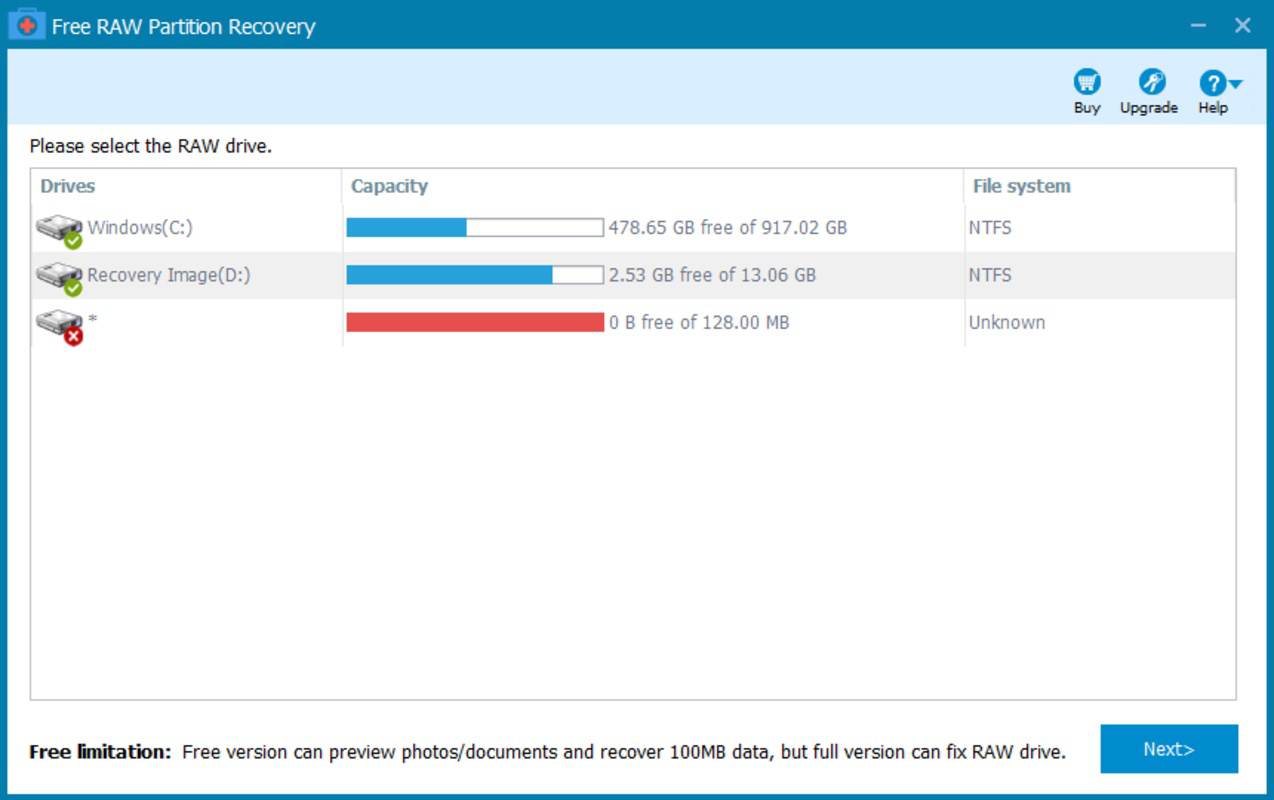
- User-Friendly Interface: Designed with simplicity in mind, the app features a clean layout with step-by-step guidance. Users can initiate recovery without prior technical knowledge, making it accessible to non-experts.
- File Format Conversion: After successful recovery, the app can convert the RAW partition to standard file systems such as NTFS or FAT32, restoring full access to the drive and preventing future inaccessibility.
- Versatile File Support: The tool supports a wide range of file types, including documents, images, videos, audio files, archives, and databases, ensuring broad compatibility across personal and professional use cases.
- Windows Compatibility: Built specifically for Windows environments, the app integrates smoothly with the operating system, leveraging native drivers and system tools for optimal performance and reliability.
For example, a photographer who accidentally formats a memory card can use the app to scan the card at the byte level, recover all image files, and convert the card back to a usable format. Similarly, a student recovering a thesis from a corrupted external drive can complete the process with minimal effort, thanks to the intuitive workflow and clear recovery progress indicators.
Interface, UX & Performance
The user interface of Free RAW Partition Recovery is designed with clarity and efficiency in mind. It features a minimalistic layout with clearly labeled buttons, progress bars, and real-time feedback during the scanning and recovery process. Navigation is linear and predictable, guiding users through each stage—from device selection to file preview and recovery destination.
Visual elements are functional rather than decorative, ensuring fast load times and low resource consumption. The app maintains responsiveness even during deep scans of large storage devices, although specific performance metrics were not provided. The developer did not list formal performance benchmarks or device compatibility thresholds, but the interface remains stable across different screen sizes and resolutions.
Responsiveness is maintained through optimized background processing, allowing users to monitor recovery progress without interruptions. While the developer did not specify minimum OS requirements or device specifications, the app appears to function consistently on standard Windows-based systems. Stability during long-running operations was not reported, but the lack of known crash reports suggests reliable operation under typical conditions.
Platform Compatibility & Technical Requirements
Free RAW Partition Recovery is available for Windows-based devices. The app’s operating system compatibility is confirmed as Windows, though specific version details were not disclosed. The file size of the application is listed as 25.6 MB, indicating a lightweight footprint suitable for installation on systems with limited storage.
Although the developer did not specify minimum OS requirements or hardware specifications, the app is designed to operate on standard Windows environments. No additional software dependencies or runtime libraries were mentioned. Users should ensure their system meets general Windows compatibility standards for running utility software. The app does not appear to require administrative privileges for basic recovery tasks, though elevated permissions may be needed for certain operations.
Pros and Cons
- Effective byte-level recovery from RAW and unformatted drives
- Simple, intuitive interface suitable for non-technical users
- Supports recovery of diverse file types across multiple formats
- Can convert RAW partitions to NTFS or FAT32 for immediate use
- Lightweight application with a small file size
- Platform limited to Windows; no support for Android or iOS
- Developer did not provide detailed system requirements
- No mobile app version available for smartphones or tablets
- Specific performance benchmarks were not disclosed
- Compatibility with newer Windows versions was not confirmed
FAQ
Is Free RAW Partition Recovery safe to use?
The app is designed to operate in read-only mode during recovery, meaning it does not alter original data unless explicitly instructed. This minimizes the risk of further data loss.
Can I recover files from a physically damaged drive?
Free RAW Partition Recovery works on logically corrupted drives. If the drive has physical damage, such as bad sectors or mechanical failure, the app may not be effective.
Does the app require a paid upgrade for full functionality?
Based on the available information, the app is offered as a free tool. However, the developer did not specify whether advanced features are locked behind a premium version.
Is it compatible with Windows 11?
While the app is designed for Windows, specific compatibility with Windows 11 was not confirmed. Users are advised to test on their system before relying on it for critical recovery tasks.
How long does the recovery process take?
Recovery time varies depending on the size of the drive and the extent of corruption. Larger drives may require several minutes to hours for a complete scan.
Final Thoughts
Free RAW Partition Recovery stands out as a focused, reliable tool for users facing the urgent challenge of accessing data from RAW or unformatted drives. Its ability to recover files at the byte level, combined with a user-friendly interface and automatic file system conversion, makes it a valuable asset for both casual users and professionals. While its platform is limited to Windows and specific technical details are not fully disclosed, the app delivers clear value in high-stakes recovery scenarios.
For anyone who has experienced sudden drive corruption or accidental formatting, this tool offers a practical and accessible path to data restoration. Its lightweight design and straightforward workflow ensure minimal friction during critical moments. If you’re dealing with a RAW drive and need a secure, efficient recovery solution, Free RAW Partition Recovery is a strong choice.
Download Free RAW Partition Recovery now
Guides & Tutorials for Free RAW Partition Recovery
How to install Free RAW Partition Recovery
- Click the Preview / Download button above.
- Once redirected, accept the terms and click Install.
- Wait for the Free RAW Partition Recovery download to finish on your device.
How to use Free RAW Partition Recovery
This software is primarily used for its core features described above. Open the app after installation to explore its capabilities.
User Reviews for Free RAW Partition Recovery 0
No reviews found


